


Pureple AI Outfit Planner
2.5157.00 Reviews
App Specs
- Version
- 39
- Updated On
- License
- Free
- Downloads
- 1,000,000+
- Developer
- Iceclip LLC
- Categories
- Beauty
- Platform
- Android, iOS
Screenshots
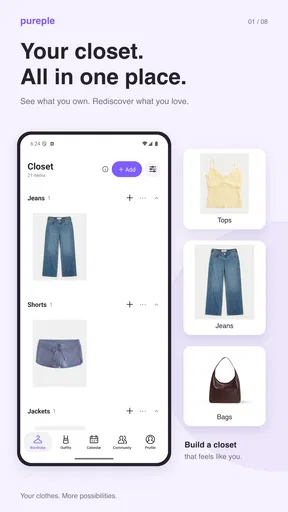
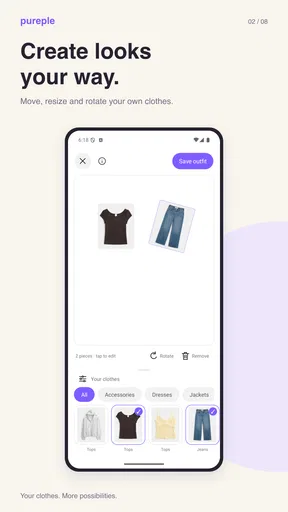
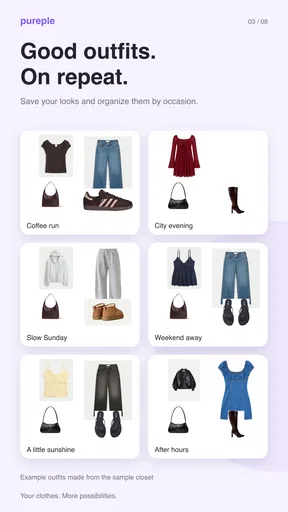
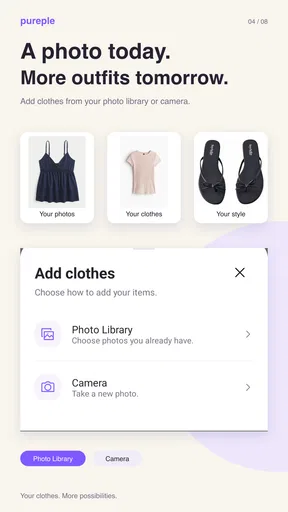
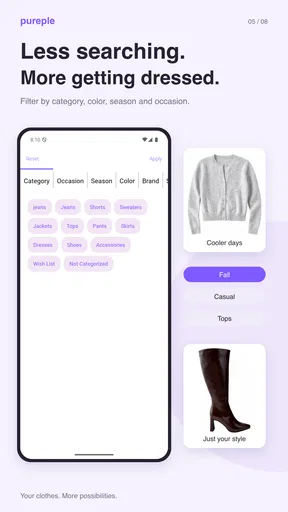
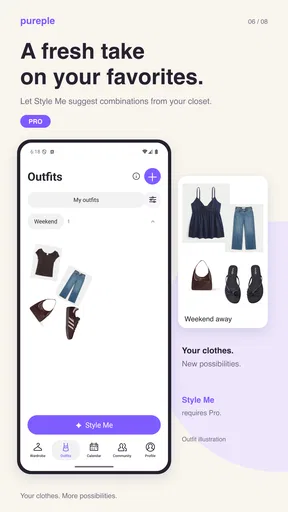
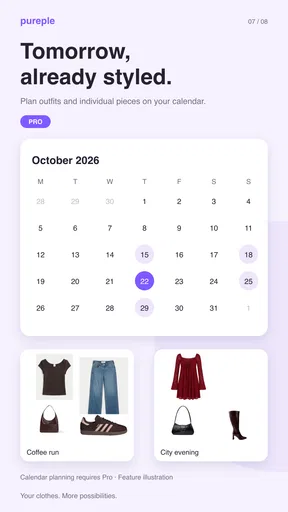
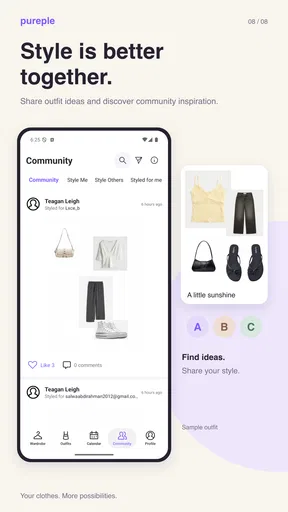
 Analysis by AppCompare
I approach a digital closet as a practical tool, not a substitute for personal taste: it should help me see what I own and make a decision when I’m short on time. Pureple AI Outfit Planner is built around that idea, pairing wardrobe organization with outfit suggestions. My main advice for a first-time user is to start small. You do not need to catalogue every hanger before the app can become useful; a handful of clothes you wear often is enough to make the first experiment feel manageable.
What to expect from a digital closet
Pureple is a free beauty and wardrobe-planning app from Iceclip LLC. It has an average rating of 2.5 from around 3.9 thousand ratings, while more than a million people have installed it. Those figures suggest a mixed reception, so I would treat it as a tool to test against your own routine rather than expect it to work perfectly for everyone. It is rated for everyone, runs on Android 5.0 and later, and its current version is 39. Optional in-app purchases range from $2.99 to $19.99 per item.
The important trade-off is that outfit suggestions depend on the clothes and preferences you enter. An app cannot make a useful combination from items it does not know about, and a sparse digital wardrobe can make its recommendations feel narrow. In return for some setup effort, you get a place to consider combinations without pulling everything out of your closet. That is most appealing if you often repeat the same few outfits simply because they are the easiest to remember.
A low-effort way to get started
Downloading Pureple AI Outfit Planner was a breeze. Available on both Android and iOS, it’s just a quick tap away from transforming your wardrobe woes into wardrobe wins. Once installed, you’re greeted with a sleek and intuitive interface. I’m a sucker for good design, and Pureple didn’t disappoint. The app is user-friendly, making it easy even for the tech-challenged among us.
The setup process involves entering some basic information like your gender, style preferences, and wardrobe pieces. Don't worry if you don’t have all your clothes logged in from the start; you can gradually add items as you go. This step is a bit time-consuming, but trust me, it’s worth it in the long run.
To keep that first session from becoming a chore, I would begin with a small, useful capsule: a few tops, bottoms, shoes, and one or two layers you reach for regularly. Choose pieces that can realistically work together instead of starting with special-occasion clothing or items you rarely wear. This gives the planner a more meaningful set to work with, and it also helps you judge whether its suggestions fit your taste before you invest more time in cataloguing.
Make the first suggestion useful
The real magic of Pureple lies in its features. The app uses AI to suggest outfits based on the clothes you already own. It’s like having a personal stylist at your fingertips. One feature I found particularly useful is the calendar. You can plan outfits ahead of time, which is a godsend for those hectic mornings.
Worth Reading Before You Choose

EA SPORTS FC Mobile 26 Is a Bigger Football Game, but It Takes Time

Flipboard Shows What News Apps Must Do Beyond the Feed

Switching to Android Auto Means Rethinking Your Driving Routine

Google Calendar Makes a Crowded Week Easier to Manage

Ludo King Makes the Most of the Minutes Between Plans

Baby Panda World Brings Quick Play to Modern Phones, but Its Game Library Feels Busy
Another nifty feature is the Style Inspiration section. This is where you can browse looks curated by fellow fashion enthusiasts and get ideas for your next ensemble. It’s like having access to a global style hive mind.
My first useful test would be a real decision I need to make, not an abstract request to dress better: for example, finding a comfortable outfit for a regular workday from clothes already logged. If a suggestion is nearly right, I would adjust it rather than dismiss the whole idea. The value is often in noticing a pairing you had overlooked, then deciding whether it suits the occasion. Inspiration can broaden your options, but your own wardrobe entries should remain the practical starting point.
Where the planner fits—and where it doesn’t
So, does it work? I decided to put Pureple through its paces by letting it choose my outfits for a week. The AI suggestions were surprisingly on point. It paired pieces I’d never thought to combine, breathing new life into my wardrobe. The app’s ability to mix and match my clothes in innovative ways was impressive.
One morning, I was running late for a meeting, and Pureple suggested a chic blazer paired with a casual tee and jeans. It was a combo I wouldn’t have considered, but I received compliments all day. The app definitely knows how to make you look good.
A realistic way to use the calendar is to plan only the commitments that tend to cause morning indecision: a meeting, a busy day of errands, or an event where you want to feel a little more put together. That keeps planning helpful rather than turning every day into homework. I would also review a planned outfit the night before if weather or comfort matters; an outfit planner can help with combinations, but it does not replace checking conditions or deciding what feels right for the day.
Compared with a notes app, a photo album, or simply deciding at the closet, Pureple’s appeal is the combination of a logged wardrobe, suggestions, and calendar planning. Those simpler alternatives take less setup and may suit someone who already knows what they own. Pureple makes more sense if you want help surfacing combinations and are willing to maintain the closet it draws from. Style Inspiration can be a useful prompt, but it is not the same as a personal recommendation based on every detail of your situation.
Common snags and sensible expectations
While I’m singing the praises of Pureple, it’s not without a few hiccups. The initial wardrobe input process can be tedious, especially if you’re someone with a vast collection of clothes. Also, the AI, while smart, sometimes suggests outfits that aren’t weather-appropriate, so a bit of manual tweaking is needed.
Another aspect to consider is that the app relies heavily on user input. The more effort you put into logging your clothes and preferences, the better the suggestions. It’s a bit of a commitment, but one that pays off.
If a recommendation seems odd, I would first check whether the relevant items and preferences have been entered clearly, then make a small correction to the outfit or wardrobe rather than starting over. This is a useful distinction: an unhelpful result may reflect incomplete inputs, but that does not mean every mismatch can be fixed by adding more data. If the suggestions still do not match your taste after a fair trial with familiar clothes, a basic checklist or your own tried-and-true outfit rotation may be less frustrating.
For someone with a large closet, the practical question is not whether to record everything immediately, but whether maintaining a digital version will save enough decision time to justify the effort. I would add seasonal or frequently worn pieces first, then expand only if the planner is helping. Someone who shops for new looks more than they rework existing clothes, or who wants precise weather-based recommendations, may be better served by a different approach to planning.
Who will get the most from it
I see the strongest fit for people who own plenty of clothes but struggle to remember combinations, those who want to plan a few outfits ahead, and anyone trying to make more use of pieces already in the closet. It may be less appealing if you dislike entering information, have a very small wardrobe, or prefer spontaneous decisions. The free entry point makes it possible to try the workflow, while optional purchases mean it is sensible to check the in-app choices before spending; the core question is whether you enjoy maintaining the wardrobe enough to keep using it.
Deciding whether to keep it in your routine
Overall, Pureple AI Outfit Planner is a game-changer for anyone looking to revamp their wardrobe without breaking the bank. It’s like having a personal stylist that not only understands your style but also helps you make the most of what you already own. Whether you're a fashion novice or a seasoned style guru, Pureple offers something for everyone.
If you’re ready to ditch the "I have nothing to wear" blues, give Pureple a try. With its smart outfit suggestions and style inspiration, you’ll be turning heads without even trying. So go ahead, download it today and step out with confidence!
Pros
- Easy-to-use interface for quick outfit planning.
- Integrates well with your existing wardrobe.
- AI suggestions improve with user feedback.
- Supports various fashion styles and preferences.
- Free to use with optional premium features.
Cons
- Limited offline functionality for on-the-go use.
- AI suggestions can sometimes be repetitive.
- Requires manual input of wardrobe items.
- Premium features can be costly for some users.
- Occasional glitches in outfit recommendation.
FAQs for Pureple AI Outfit Planner
What is Pureple AI Outfit Planner and how does it work?
Pureple AI Outfit Planner is a digital wardrobe assistant that helps users create stylish outfits from their existing clothing. By uploading photos of your clothes, the app uses AI to suggest combinations based on color, style, and occasion. It also considers weather and user preferences to offer personalized outfit ideas.
Is Pureple AI Outfit Planner free to use?
Yes, Pureple offers a free version with essential features for outfit planning. However, there are in-app purchases and subscription options that unlock additional features such as premium styling tips, advanced wardrobe organization, and ad-free experience. Users can decide based on their needs and budget.
How secure is my data on Pureple AI Outfit Planner?
Pureple AI Outfit Planner takes user privacy seriously. Photos and personal data are stored securely and are not shared with third parties. The app uses encryption to protect your information, ensuring that only you can access your uploaded content. Always check their privacy policy for detailed information.
Can Pureple AI Outfit Planner be used offline?
While some features of Pureple AI Outfit Planner can be accessed offline, such as viewing your saved outfits, the full functionality requires an internet connection. This includes accessing the AI suggestions and syncing your wardrobe across devices. Ensure you have a stable connection for the best experience.
Does Pureple AI Outfit Planner support multiple devices?
Yes, Pureple allows users to sync their wardrobe and outfit suggestions across multiple devices. By creating an account, you can access your wardrobe from any smartphone or tablet, ensuring that your style assistant is always at your fingertips, no matter which device you are using.


